Gateway Network Connections
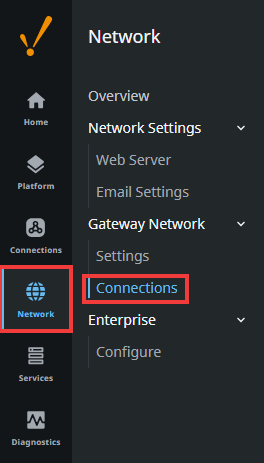
This page gives a general overview of the Gateway Network Connections page for Outgoing Connections, Incoming Connections, and Remote Gateways on Gateway Network webpage. You can find the Gateway Network Connections page by going to your Gateway webpage, then navigating to Network > Gateway Network > Connections. See Queue Management and Proxy Rules for more information on those tabs.
Outgoing Connections Tab
The Outgoing Connections tab allows you to create outgoing Gateway Network connections from your current Gateway. Remote certificates and outgoing connections will be displayed here, and different metrics are shown depending on if you are viewing one or the other.
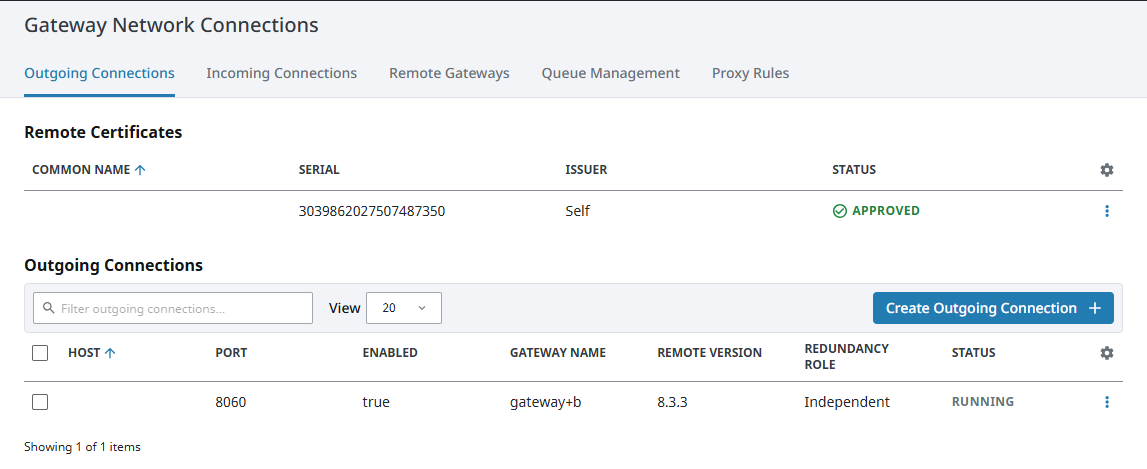
You can expand more actions for each list item by clicking on the three dots menu. From here, remote certificates can be approved, denied, or deleted, and outgoing connections can be edited, reset, duplicated, disabled, overridden, or deleted.
Remote Certificates
| Attribute | Description |
|---|---|
| Common Name | The name of the system the remote certificate originates from. |
| Serial | The serial of the remote certificate. |
| Issuer | The authority that issued the remote certificate. |
| Status | The current status of the remote certificate. |
Outgoing Connections
| Attribute | Description |
|---|---|
| Host | The hostname of the system the current Gateway has an outgoing connection to. |
| Port | The port number used by the outgoing connection. |
| Enabled | Indicates whether or not the outgoing connection is enabled. |
| Gateway Name | The name of the remote Gateway the current Gateway has an outgoing connection to. |
| Remote Version | The version of Ignition the remote Gateway is running. |
| Redundancy Role | The role of the remote Gateway in a redundant pair. |
| Status | The status of the outgoing connection. |
Incoming Connections Tab
The Incoming Connections tab will show a list of remote Gateways and certificates that are trying to connect to your current Gateway. Here, you can approve remote certificates and incoming Gateway Network connections. Like the Outgoing Connections tab, different metrics are shown depending on if you are viewing remote certificates or incoming connections.
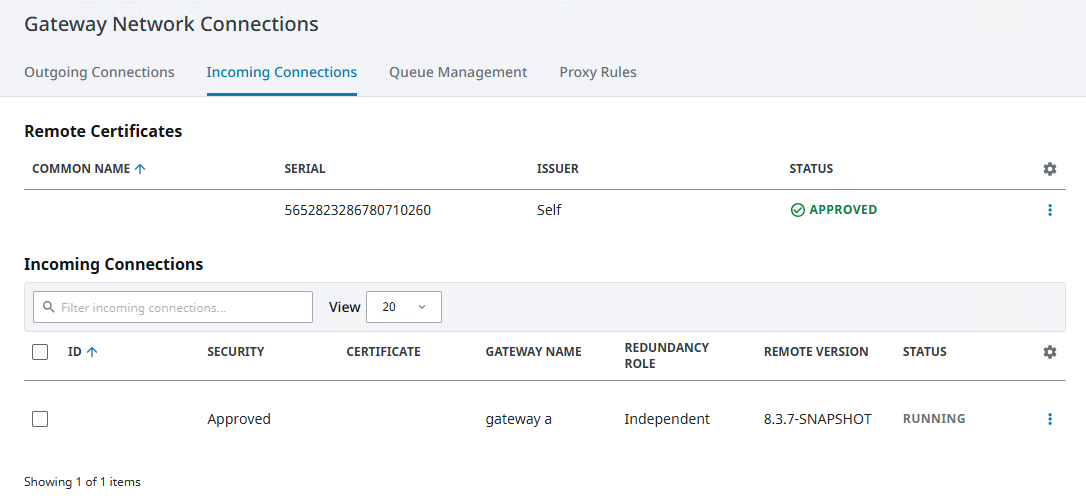
You can also take more actions for each item by clicking on the three dots menu. Remote certificates can be approved, denied, or deleted, and incoming connections can be approved, reset, denied, overridden, or deleted.
Remote Certificates
| Attribute | Description |
|---|---|
| Common Name | The name of the system the remote certificate originates from. |
| Serial | The serial number of the remote certificate. |
| Issuer | The authority that issued the remote certificate. |
| Status | The current status of the remote certificate. |
Incoming Connections
| Attribute | Description |
|---|---|
| ID | The Gateway ID that the incoming connection originates from. |
| Security | The security state of the incoming connection. |
| Certificate | Indicates which system the remote certificate comes from and the certificate's serial number. |
| Gateway Name | The remote Gateway the incoming connection originates from. |
| Redundancy Role | The role of the remote Gateway in a redundant pair. |
| Remote Version | The version of Ignition the remote Gateway is running. |
| Status | The status of the incoming connection. |
Remote Gateways Tab
The Gateway Network Remote Gateways tab is designed to give a quick overview of the status of all Gateways within the Gateway Network. This tab displays a list of all current Gateway Network connections both incoming and outgoing, as well a list of all Remote Gateways that the local Gateway can see both from its Gateway Network connections and through proxy connections. If a Gateway connection is faulted, the status message in red can be selected to see the error that pertains to why it is faulted.
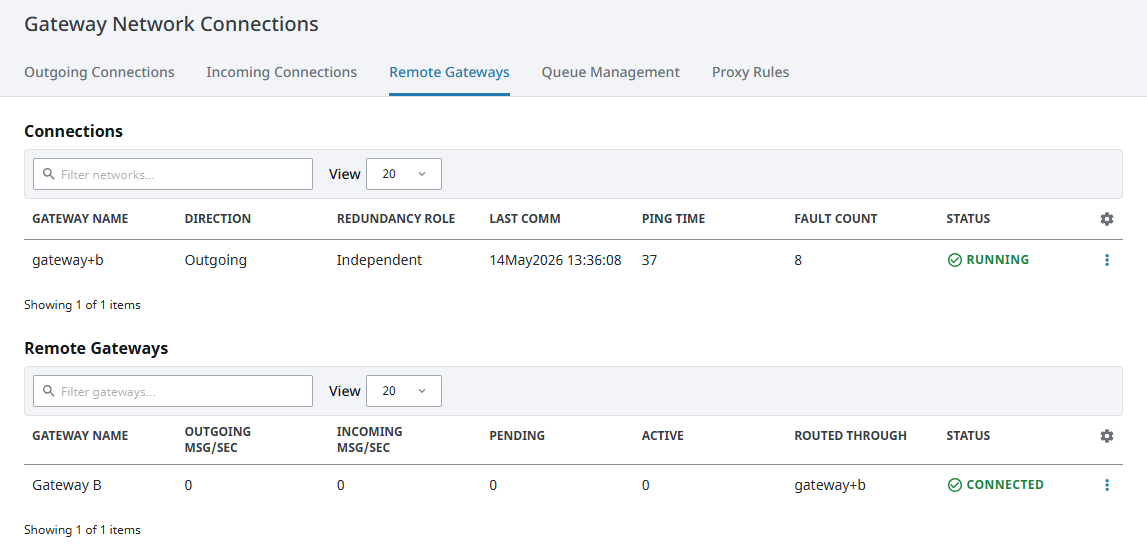
Any Gateway Network connections with a status of Running, or Remote Gateways with a status of Connected can be drilled into by clicking the three dots menu to the right and selecting View Details. On the View Details page, metrics for the selected Gateway Network connection or Remote Gateway are displayed, giving an idea of the rate of data transfer between the two Gateways, as well as a list of recent connection events. See the Remote Gateways and Connections Details page for in-depth information.
Connections
| Attribute | Description |
|---|---|
| Gateway Name | Name of the Remote Gateway connection. |
| Direction | The direction of the Gateway Network connection. Can either be Incoming or Outgoing. |
| Redundancy Role | The redundancy role of the Gateway. Can either be Independent, Backup, or Master. |
| Last Comm | The time of the last communication with the Gateway. |
| Ping Time | Reaction time of Gateway connection. How fast you get a response after you've sent out a request. |
| Fault Count | Number of times the connection has faulted since the Gateway has been started. |
| Status | Current state of the Gateway Network Connection. |
Remote Gateways
| Attribute | Description |
|---|---|
| Gateway Name | Name of the Remote Gateway. |
| Outgoing Msg/Sec | The number of outgoing messages per second. |
| Incoming Msg/Sec | The number of incoming messages per second. |
| Pending | Number of messages pending in a queue that are waiting to be dispatched to the Gateway Network connection. |
| Active | Number of messages that are currently being dispatched to the Gateway Network connection. |
| Routed Through | How the Gateway is connected to the Remote Gateway. |
| Status | Current state of the Remote Gateway Connection. |