Error Handling
The concept of error handling is recognizing when an error might occur in a block of code, and instead of throwing the error, handling it gracefully. This can involve providing a personalized error message, letting a user know that their attempt to run the code failed, or even undoing something that the code set it motion so that it can be started again.
Understanding Try and Except Structure
Within Python, try blocks can be used to handle errors. The structure of a try block requires the inclusion of except blocks, and can be further expanded with the use of else, pass, or finally keywords. The Error Handling Example will gradually build out these elements to explain each usage.
But first, we’ll demonstrate the basic structure of these blocks, where try: is followed by the code we want to test and except: is followed by the code to run if there is an error. The code will then execute in the following order:
- The
tryblock is run, and the code within is executed line by line.- If an error occurs, the code in the
tryblock will immediately stop and theexceptblock will begin to execute. - If no error occurs after all code in the
tryblock has been executed, thetryblock will be finished and the code in theexceptblock will be skipped.
- If an error occurs, the code in the
- After either outcome, any code after the
exceptwill then execute.
# With try, we can attempt any amount of code.
try:
    some code
    more code
    even more code

# If any of lines in the try block were to throw an error, then we move down and run the block under except.
# The except statement is NOT optional.
# You must define what your code should do in the event an exception occurs.
except:
    failover code
This execution order makes these blocks useful in situations that require user input, where something may have been incorrectly entered and resulted in an error.
Error Handling Example
We will use a division example to demonstrate how error handling works since we can easily cause errors. To begin, we will start with code that will print a value of 50, with no error in the division and the try block finishing successfully.
# We start with a value, which could represent some user input.
x = 2

# We use that value in our try block, and have a simple print statement if there is an error.
try:
    value = 100/x
    print value
except:
    print "An error occurred!"
The except block can be tested by changing the value of x to 0. In this case, the statement "An error occurred!" would print.
Although each try block must be followed by at least one except block, it is not limited to only one except block. Multiple except blocks make it possible to handle different types of errors separately. This is done by listing the error object after the except keyword and before the colon. The specific classes listed in your except clause are checked against the thrown exception, in declaration order, to see if they are a direct or superclass match.
For example, making an exception to describe dividing by zero as a specific error would look like the following:
# We start with a value, which could represent some user input.
x = 0

# Use the user input in division in our try block.
try:
    value = 100/x
    print value

# If the exception that would occur is of type ZeroDivisionError, we can run a specific block of code
except ZeroDivisionError:
    print "Dividing by zero is not allowed. Please stop trying to divide by zero"
# We can then have a second exception without a specific error. This except acts as a catch-all;
# if the user caused an exception we didn't account for above, we can failover to the block of code below.
except:
    print "An error occurred!"
The except blocks in the code above cover all possible errors as represented in the table below. Now, we have a more tailored approach to how we handle errors while still catching all that may occur.
| Inputs (x value) | Result | Output |
|---|---|---|
| 2 | Successful Result | 50 |
| 0 | Specified Zero Division Error | Dividing by zero is not allowed. Please stop trying to divide by zero |
| 'a' | Unspecified Error | An error occurred! |
In addition to each try block having more than one except block, each except block can also name multiple types of errors. Keep in mind that an error occuring within a try block will only ever trigger a single except block.
try:
    some code
except (ZeroDivisionError, RuntimeError, TypeError):
    failover code
Determining the Error Object
To determine the name of the error object that will be thrown from certain errors, we can take a look at the error. We already know dividing by zero gives a ZeroDivisionError, but we can force another error to display a different error object. Dividing by a string of a without including any error handling would instead show the following error:
Traceback (most recent call last):
File "buffer", line 3, in module
TypeError: unsupported operand type(s) for /: 'int' and 'str'
The last line of the error includes the name TypeError followed by the cause of that error, which makes sense as the string a is the wrong type to be using in division.
Not all errors are so straightforward, and may require a bit more effort to discover. For a list of Python error names see the Built-in Exceptions page in the Python docs. Additionally, because Ignition is written in Java, many methods, including built-in system library functions, may throw Java exceptions. In these cases, Oracle's documentation on the base Throwable class is more useful.
Additional Keywords
Pass
The pass keyword is unique in that it does nothing but fill in a spot where code is required. This is useful if we want to handle the exception so that it doesn't throw an error message, or any other type of response. In this case, we can use pass to tell the script to continue with no further action.
try:
    some code
    more code
except:
    # The error will bring the code to the exception, and then the exception will simply do nothing.
    pass
Else
The else keyword allows you execute code when there was no error.
try:
    some code
    more code
except:
    print "An error occurred!"
else:
    print "All good here!"
Finally
The finally keyword offers a way to wrap up the code execution cleanly, regardless of if an error existed or not. In this example, whether or not "An error occurred!" is printed, "the Finally Keyword code example is complete." will also print out, confirming that the try block has completed all execution steps. This is most useful in situations where you need to do some "cleanup" task, whether your code succeeded or threw an error.
try:
    some code
    more code
except:
    print "An error occurred!"
finally:
    print "The Finally Keyword code example is complete."
Java Exceptions
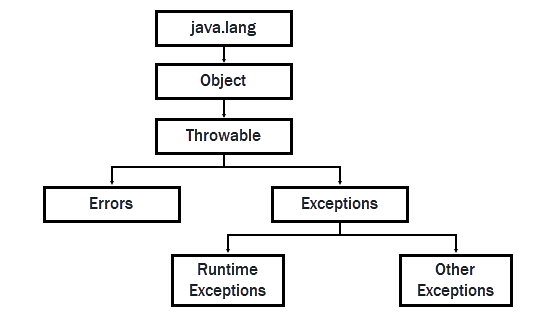
Although scripting in Ignition is done in Python, system library functions may also throw Java exceptions, since Ignition is written in Java. The Python scripts demonstrated above will not catch these, because Jython models Java exceptions as an entirely separate exception hierarchy. Importing Java's Exception class with java.lang.Exception will catch most exceptions thrown in Java code, excluding only "unrecoverable" errors such as OutOfMemoryError.
# Import the Exception class
import java.lang.Exception

# With try, we can attempt any amount of code
try:
    code you want to test
    more code
    code that will throw an exception

# If any of lines in the try block were to throw an error, then we move down and run the block under except.
# The except statement is NOT optional
# You must define what your code should do in the event an exception occurs.
except java.lang.Exception as e:
    failover code
Ultimately, all Java exceptions and errors inherit from the Throwable class, so you can choose to intercept even normally unrecoverable errors such as StackOverflowError or OutOfMemoryError by widening your except clause to Throwable.
from java.lang import Throwable

try:
    code you want to test
    more code
    code that will throw an exception
except Throwable as t:
    failover code
except Exception as e:
    failover code
Common Exceptions
Some common exceptions are listed below:
-
ArrayIndexOutOfBoundsException: This typically occurs when a line of code attempts to access an index in a collection, but the index specified doesn't exist.
myDataset = system.dataset.toDataSet(["colName"],[[0]])

# This will fail because the dataset only has a single row,
# so trying to read the value at row index 5 means we're trying to
# read something that doesn't exist.
print myDataset.getValueAt(0,5) -
AttributeError: Typically seen when a script tries to access a property that doesn't exist. For example, when a script tries to get the value of a property on a component, but the property name is misspelled.
myVar = 10

# integers do not natively have a name variable, so this will fail with an AttributeError.
# there isn't an 'attribute' on an integer by the name of 'name'
print myVar.name -
IndexError: Similar to ArrayIndexOutOfBoundsException above, but occurs with a Python specific object, such as a list.
myList = [1,2,3]

# There isn't an element in the list at index 4, so this will fail.
print myList[4] -
NameError: Occurs when the local or global name is not found. Typically happens when referencing a variable that hasn't been assigned a value.
# We haven't given a value to the variable myValue, so it will fail.
print "The value of the variable is: ", myValue -
TypeError: A TypeError occurs when a function or similar operation is applied to another object of an incorrect type.
myList = [1,2,3]

# The first argument for pop() expects an integer, so passing a string value is innappropriate.
# Passing a string to pop() will return a TypeError.
print myList.pop("0")</pre> -
ValueError: A ValueError is returned when the value of an argument is inappropriate. Typically the exact issue is returned in the returned exception.
myVar = "Hello"

# Strings can be passed to the int() function, but the value needs to be something that
# can be coerced into an integer, like "0".
# Because "Hello" can't be easily converted, the line below will fail.
print int(myVar)
Example
In the complete example below, you can see how all these possible variants of Python's try and except mechanism can be used in combination with Ignition's system functions to offer robust error handling for your code.
from java.lang import Throwable

__log = system.util.getLogger("myTransactionUtil")

def doSomethingWithTheDatabase(args):
	tx = system.db.beginTransaction("myDatabase")

	try:
		return system.db.runPrepUpdate("query", [args], tx=tx)
	except Exception as e:
		# roll back the transaction
		system.db.rollbackTransaction(tx)
		__log.warnf("Update failed due to Jython Exception: %s", e)
	except Throwable as t:
		# roll back the transaction
		system.db.rollbackTransaction(tx)
                # full Java exception stacktrace is captured in logs
		__log.warn("Update failed due to Java Throwable", t)
	else:
		# no exceptions were thrown - commit the transaction
		system.db.commitTransaction(tx)
	finally:
		# whether an exception was thrown or not, we need to clean up and close the transaction
		system.db.closeTransaction(tx)