Format Transform

The Format Transform applies a format string to the value returned from the binding, allowing you to format the way the output is displayed. Typically this applies to a date or number format. The return type for all Format Transforms is a string.
When configuring a Format Transform, you'll see different settings based on the Format Type selected:
- Datetime: A date will be formatted to appear a certain way.
- Numeric: A number will be formatted to appear a certain way.
Format (Numeric only)
- Pattern: Applies a number pattern based on the Format Pattern entry. The option is helpful when wanting to add leading zeros on a display.
- Format Pattern: Uses
0and#to set the pattern.
- Format Pattern: Uses
- Integer: Rounds input (float) to integer.
- Number: Formats number based on Locale setting, and will then place the commas or other number separators as applicable.
- Percent: Converts the input number into percent. For example, 0.123 would format to 12.3%.
- Currency: Uses the currency specified by the Locale setting.
Format (Datetime only)
- Pattern: Custom date format string. For example,
M/D/YYYY h:m:s a. - Date: Date only will be shown.
- Time: Time only will be shown.
- Datetime: Date and Time will be shown.
Date (Datetime only)
- Full: Example format - Monday, March 18, 2019.
- Long: Example format - March 18, 2019.
- Medium: Example format - Mar 18, 2019.
- Short: Example format - 3/18/19.
Time (Datetime only)
- Full: Example Format - 2:02:46 PM Pacific Standard Time.
- Long: Example format - 2:02:46 PM PST.
- Medium: Example format - 2:02:46 PM.
- Short: Example format - 2:02 PM.
Locale
- auto: Default time zone of Session. Use the dropdown to select a different language.
Time Zone (Datetime only)
- auto: Default time zone of Session. Use the dropdown to select a different time zone.
See the Data Type Formatting Reference page for more information.
Examples
Numeric Pattern
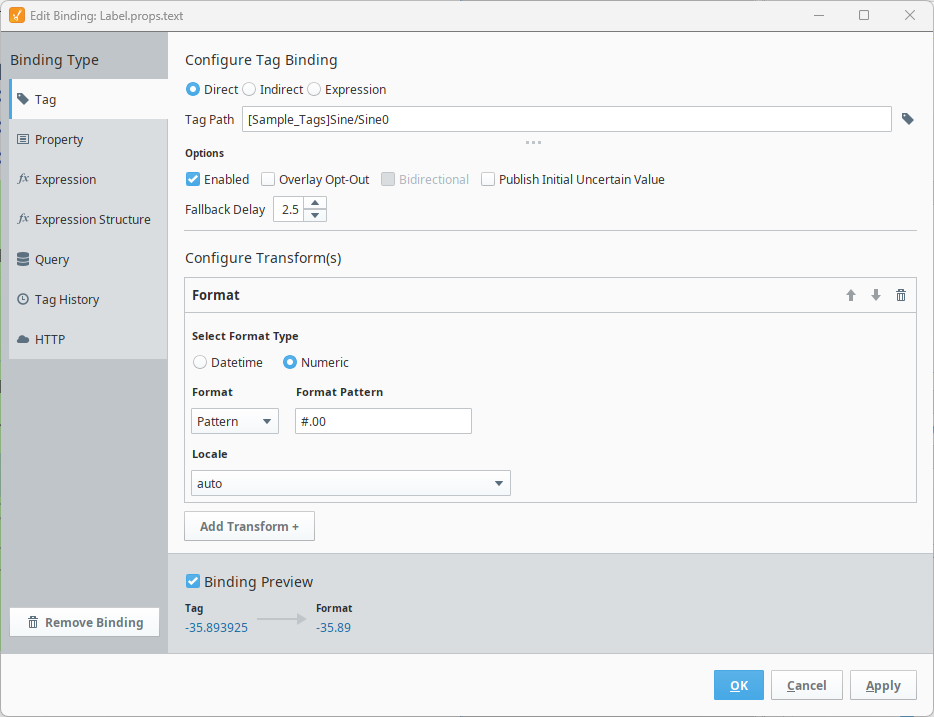
In the image below, an expression on a Tag binding is retrieving the value from a tag. As shown in the preview, the value on the tag shows -35.893925.
The Format Transform is taking that tag value, then applying a numeric pattern of #.00, which denotes that two digits must always be shown after the decimal point. As a result, the preview shows a Format value of -35.89, since any digits beyond the first two decimal places are ignored by the transform.
Datetime Short, Short, Time Zone Adjusted
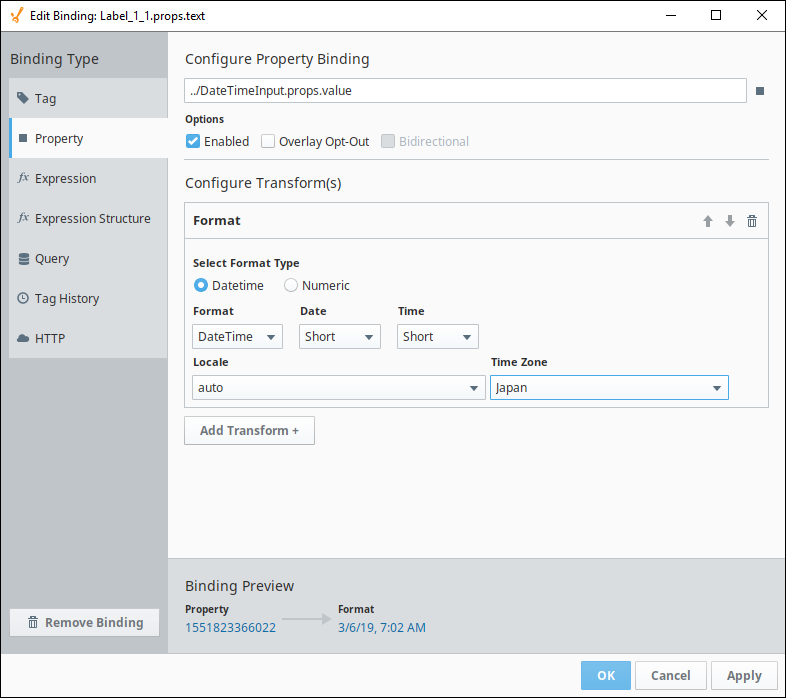
The image below is taking a Unix timestamp value (including milliseconds) of 1551823366022, and turning it into a human readable date (set to Japan's time zone) of 3/6/19, 7:02 AM.