Perspective - Alarm Journal Table Scripting
This page details the component-specific functions available for the Alarm Journal Table component. Right-click on the component or select Components from the Designer menubar to access the Configure Events and Configure Scripts popups.
Component Functions
.refreshData()
- Description
- Refreshes the data on the Alarm Journal Table.
- Parameters
- None
- Return
- Nothing
Extension Functions
.filterAlarm
- Description
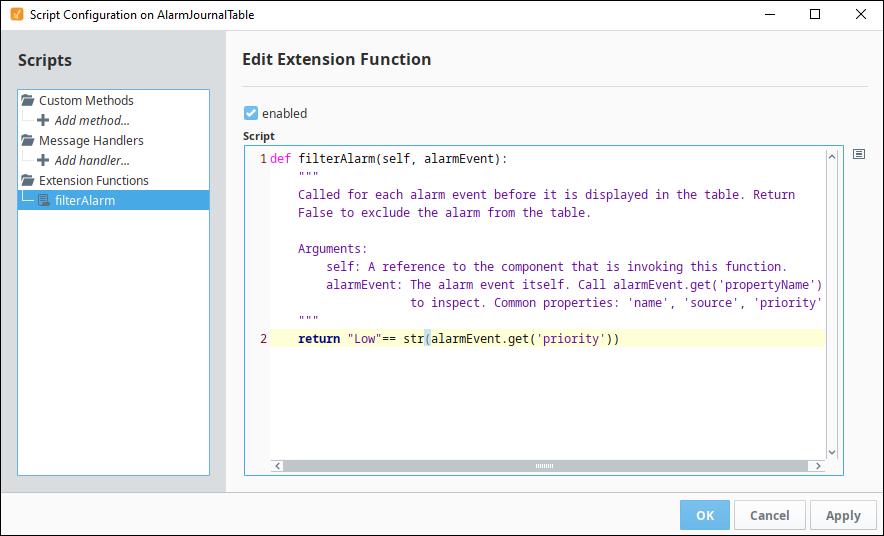
- Called for each event before it is displayed in the table, allowing you to hide or show each alarm event (row) in the table. Provides an opportunity to write a more complex filter than what's normally provided to the component. Return False to exclude an alarm event from the table.
- Parameters
- ComponentModelScriptWrapper.SafetyWrapper self- A reference to the component that is invoking this function.
- PyAlarmEvent alarmEvent - The alarm event itself. Call
alarmEvent.get('propertyName')to inspect properties on the event. Common properties:name,source,priority.
- Return
- Boolean - The function must return either a True or False for every alarm event in the table. True will show the alarm. False will hide the alarm.
Examples
With the built-in alarmEvent object all alarm event properties are accessible to this function, and can be used to help determine if any given event should appear on the table. Furthermore, Associated Data (also known as custom alarm properties) can be examined from the same event.
# Replace Property Name below with a the name of the property you wish to filter on.
if alarmEvent.get('Property Name'):
    return True
# It's important that you return a False value for the events you don't want to see in the table.
else:
    return False
You could also condense the code example above by using something like the following:
return "Low"== str(alarmEvent.get('priority'))